
A media unit should fit the equipment people actually use
A TV stand needs to accommodate more than a screen. Streaming boxes, a soundbar, game consoles, controllers and power adapters all compete for space. Planning those items before choosing a unit makes the furniture easier to use and gives retailers a more useful product story than appearance alone. This guide helps furniture buyers and interior designers assess a media unit through its daily tasks.
Key takeaways
- Match the unit to the actual television base and operating equipment.
- Review cable access, device ventilation and storage as one arrangement.
- Confirm internal dimensions and installation details before approval.
Start with an equipment inventory
List each device and measure its width, depth and height. Include plugs, connectors and the space required to reach controls. A device can fit inside a compartment while its cable cannot turn comfortably behind it. Check the actual television feet or pedestal footprint against the usable top surface, and confirm the furniture load rating with the supplier. Screen diagonal alone does not establish compatibility.
For example, consider a household with a television, a soundbar and two game consoles. The soundbar may need the top surface, one console may stand vertically, and another may require room to load a disc. A cabinet with several equal closed compartments could look orderly yet fail this particular setup. Build the equipment arrangement first, then judge which shelf and drawer combination supports it.
Compare relevant styles within the Hometree furniture range.
Plan cable routes from device to socket
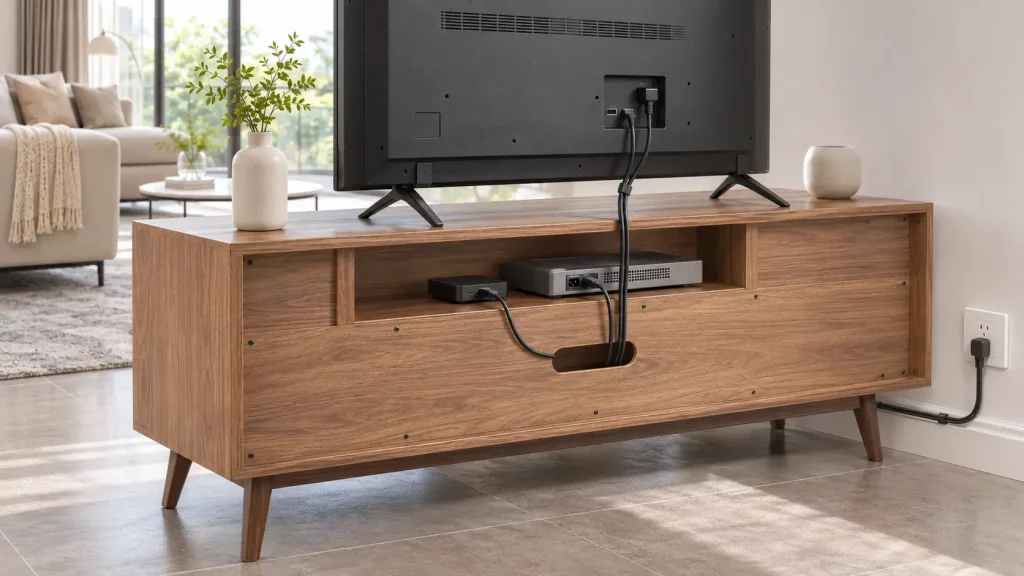
Sketch where power, signal and speaker cables will travel. Rear openings should correspond to the intended compartments rather than simply exist somewhere on the back panel. Confirm that connectors can pass through them and that the unit can sit at the intended distance from the wall. Separate the visible front view from the practical rear view during product evaluation. A tidy photograph does not show whether a cable has been pinched.
Include power adapters in the drawing: their depth can prevent a cabinet from sitting where the floor plan suggests. Check whether a removable panel or accessible opening makes maintenance practical. Keep cable labels at both ends where several similar connectors are used. These small decisions make future replacement easier and prevent the storage compartment from becoming an inaccessible bundle of wires.
Give operating equipment the space it needs
Follow the ventilation clearances in each equipment manufacturer’s instructions. An enclosed cabinet may be useful for accessories but unsuitable for equipment that releases heat during operation. Check whether doors interfere with remote controls, wireless connections or access to switches. There is no universal ventilation gap that makes every device suitable for every compartment. Evaluate the specific equipment and furniture together.
When reviewing a sample, place the intended devices in their operating positions rather than checking an empty shelf. Open the doors and inspect the available space at the back as well as above the equipment. If ventilation requirements cannot be met, choose another compartment arrangement or locate the device elsewhere. A photograph of a console inside a cabinet does not confirm that it can operate there.
Assign storage according to frequency of use
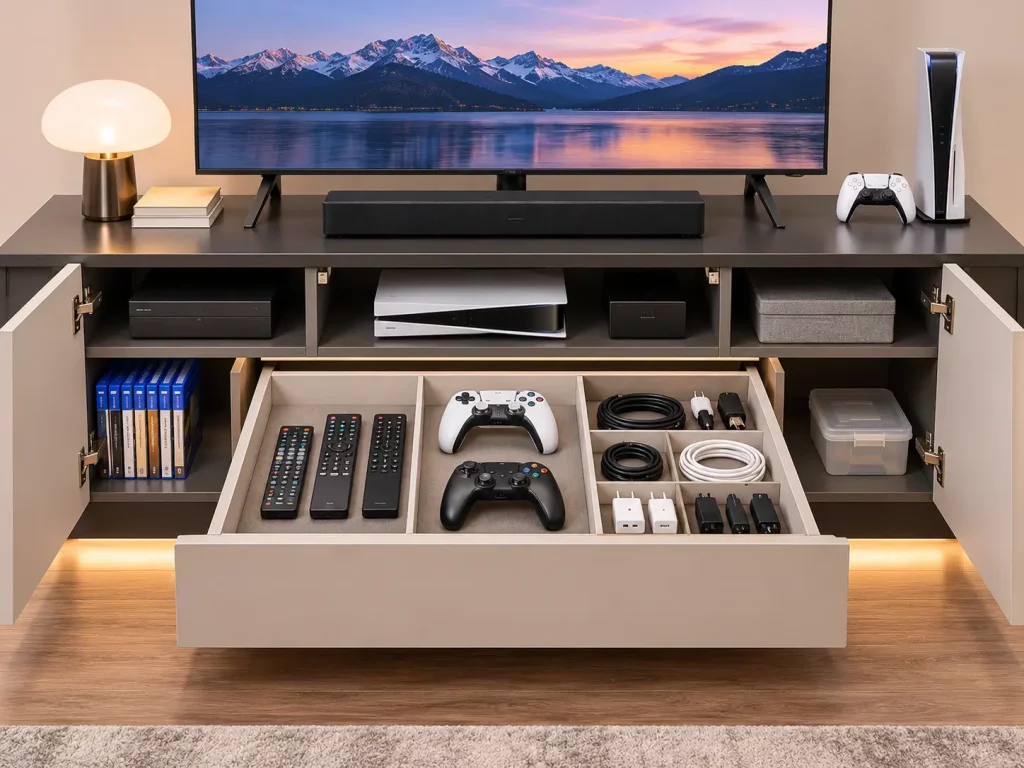
Place frequently used controllers and remotes where they are easy to reach. Reserve closed storage for spare cables, manuals and accessories that would otherwise collect on the top. Compare internal dimensions with the objects intended for storage. Door openings, hinges and drawer sides reduce usable space, so overall cabinet dimensions are not a substitute for compartment measurements.
An effective media unit often mixes open and closed storage because operating equipment and loose accessories have different needs. For a retailer, show both arrangements in the product information: one view for the complete appearance and another with doors open. Customers should be able to see shelf divisions and drawer access before deciding whether the unit fits their routine.
Consider access after installation
Imagine replacing a cable after the room is furnished. Can someone reach the connection without unloading the entire cabinet? Can doors open beside a nearby wall or speaker? Check the skirting board, socket position and clearance for cleaning. If the furniture requires anchoring, follow its supplied instructions and choose fixings suitable for the wall with appropriate professional advice. Keep those installation requirements visible in the product information.
For a detailed product brief, review the design and development process.
Prepare a useful retailer specification
Show internal compartment sizes, rear openings, shelf positions and the assembled rear view alongside overall dimensions. Identify adjustable shelves only where the specification confirms them. State what is included and keep device props separate from the product offer. This information helps a customer assess fit before purchase and helps sales teams answer concrete questions consistently.
Avoid describing a cable opening as a complete cable-management system unless the details justify that description. State where the openings are, which compartments they serve and whether shelves or back panels can be adjusted. If a product has multiple versions, keep photographs and drawings matched to the correct version. A specification should explain the unit actually offered for sale.
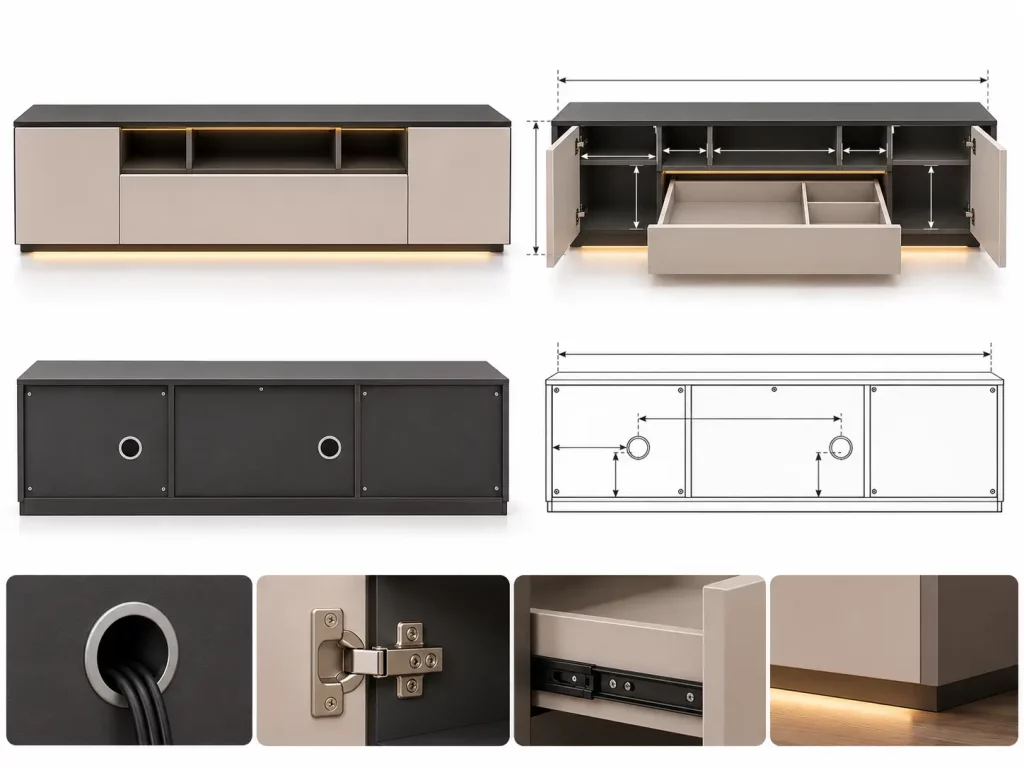
A practical review sequence
Begin with the equipment list, then check the television base, compartment dimensions, cable route and access. Review ventilation against device instructions. Open every door and drawer in the intended room position. Finally, review the furniture’s load and installation information. Record unresolved points before approving the product for a particular setup.
A useful approval record can have five fields: requirement, confirmed dimension, drawing reference, sample observation and action owner. Record the equipment model where compatibility is being assessed. That creates a repeatable reference for the sales team without implying that one successful setup proves compatibility with every television or device.
Frequently Asked Questions
How do I choose a TV stand for my television size?
Check the television support footprint and weight against the furniture specification, then review the room and the equipment that will share the unit. A screen diagonal describes the display; it does not describe the position of its feet or the load the cabinet is designed to carry.
Can a game console operate inside a closed TV cabinet?
Check the device manufacturer’s ventilation and placement instructions against the exact compartment arrangement. Confirm access to controls and connectors as well. If the cabinet cannot meet those requirements, select a more suitable arrangement instead of relying on the appearance of a staged image.
What should retailers include in a TV stand product page?
Show overall and internal dimensions, rear openings, shelf positions, storage access and the assembled rear view. Include confirmed load and installation information. Explain adjustable features only where they are part of the actual specification, and distinguish photographed electronics from items included in the purchase.
How can buyers keep media storage useful over time?
Allow for access to connections and for the objects that are handled frequently. A combination of accessible device space and closed accessory storage can be useful, but the arrangement should follow the intended household equipment and routine. Recheck fit when a television or other device changes.
Plan the furniture around real use
Effective TV stand cable management begins with the devices, sockets and everyday storage routine. Use those details to judge the design, then coordinate its material and proportion with the room. Explore Hometree’s living furniture range and share your equipment and storage brief when discussing a project.
To discuss your collection requirements, contact the Hometree team.